The worst kept secret in communications.
Radio amateurs focused on emergency and survival communications depend heavily on traditional ham radio modes. There’s a good reason for that…they work! But every mode has shortcomings that can be amplified during urgent need. Other electronic communication systems outside the realm of amateur radio can and should be considered. The most common alternatives are CB radio, GMRS, and MURS. Meshtastic™ is often at the bottom of the list, if it’s even on the list at all. Most hams have at least heard of it, but it is not well understood beyond a small group of devotees. Meshtastic offers a lot of utility for little money or effort. Radio amateurs concerned with disaster operations and those who simply like to keep up with technology will find a significant force multiplier in Meshtastic.
What is Meshtastic?
Meshtastic is an open-source digital communications protocol invented in 2020 by embedded systems engineer Kevin Hester. It offers LoRa (Long Range) wireless communications. The system does not require the internet, cell service, routers, or any outside resources beyond the actual devices in the network. It truly is a standalone, off-grid service. Meshtastic wireless devices require no licensing or fees; the FCC does not even need to know you are using it.
There are some limitations and caveats. Meshtastic is a text messaging system. The protocol cannot accommodate voice, photos and videos, or data files. It is not internet-based; communication is limited only to the designated mesh network. Bandwidth is low; network congestion can slow messaging down if too many users are active at once.
One important distinction is that LoRa in the context of Meshtastic does not mean what most radio amateurs think of as “long range”. It is certainly not DX. Meshtastic is limited to line-of-sight communications, where most users can expect a typical transmission range of around 1–3 miles. Like all forms of radio, the range can vary considerably depending on local terrain, antenna, interference, elevation, etc. Sending messages through other users’ devices or standalone relay nodes is possible and will also extend transmission coverage.
It’s also worth noting that Meshtastic was not invented by a large business, a government agency, a university, or as a byproduct of something else. It was developed by one guy with the intention of being a free, independent, open source system anyone can use. By its very nature, Meshtastic cannot be unilaterally shut down by any group, civil authority, court, individual, or corporation.
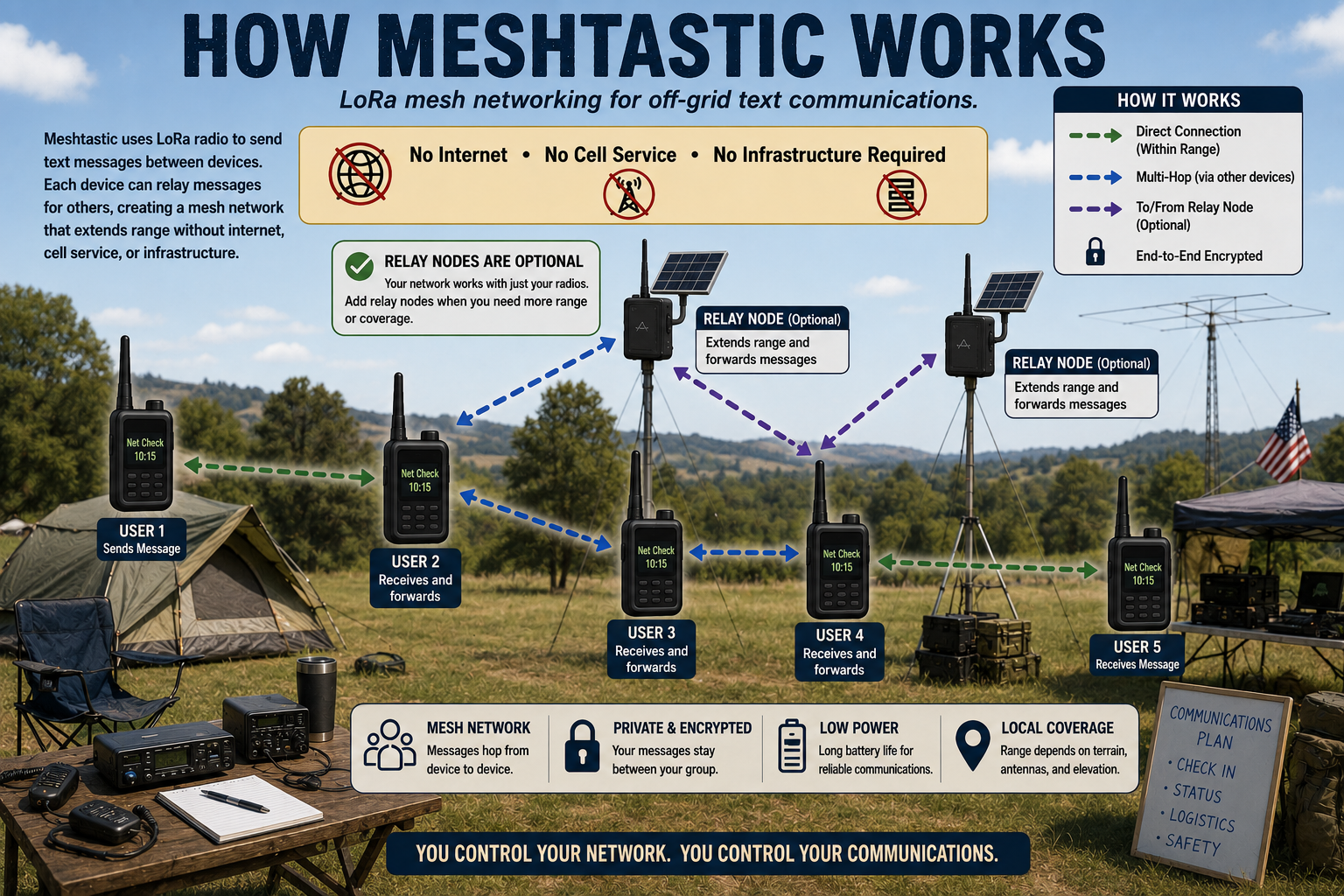
GRAPHIC CREATED BY ARTIFICIAL INTELLIGENCE FOR OFF GRID HAM.
Hardware: Every ham loves it.
Amateur operators are renowned for being attracted to equipment. After all, have you ever met a ham who isn’t thoroughly impressed by racks and racks of radio gear and multi-acre antenna farms?
What’s impressive about Meshtastic is how little equipment is required. Each user will need an Android or iOS smartphone or tablet. Nearly everyone over the age of ten already has one, so you’re probably halfway there! Everyone will also need the free Meshtastic app and a Meshtastic radio. Depending on the radio, you may need a computer with an internet connection and a USB cable to flash the firmware. Meshtastic-capable radios are easily available online. Most are under $100 and some are under $50.
The typical Meshtastic radio is pocket-sized and includes an internal battery. The protocol operates on different frequency bands that vary depending on what country you’re in. In the United States, the most common Meshtastic frequencies are in the 915 MHz band. Other regions use the 433 MHz, 868 MHz, and 2.4 GHz bands.
Additional hardware, such as solar-powered standalone relay nodes, adds utility and range to your network but is not required for basic operation.
Running without a smartphone.
If using Meshtastic with a smartphone or tablet does not appeal to you, you’re not out of the game. Many manufacturers offer “all-in-one” Meshtastic radios with a dedicated screen and keyboard, similar in appearance to the old BlackBerry cellphones. These devices cost more than basic radio-only models. However, each one is a complete system in a single box that does not require any external hardware.
Power consumption.
Truly accurate power consumption and run time are hard to calculate due to all the variables. Even so, there is enough published data to make some reasonable estimates. The type of processor in your radio has a significant effect on battery discharge rate. Radios based on ESP32 microcontrollers are relatively power hungry and on average will operate for 10-20 hours. Radios with the nRF52 microcontroller are more efficient and will run about 50-150 hours. These numbers assume a 1500 mAh battery and 25% duty cycle.
Batteries most often used in Meshtastic radios will charge quickly even with modest power sources. So this is an easy call: if long battery life is your top priority, get a radio with an nRF52 microcontroller. Still, the charge times should be fairly fast with the off-grid power equipment hams typically have, so for many operators it may be a distinction without a difference.
Finally, radios based on ESP32 and nRF52 are fully interoperable. You do not need every radio to have the same microcontroller.
Don’t worry, this won’t make your head explode!
You’ve chosen your radios, you already have a tablet or smartphone, and you’re ready to get on the air with Meshtastic. What next?
Right out of the box, let’s dispel any nightmares you may have about dreadful software and getting everything to talk to everything else. This isn’t like the early days of RTTY and AMTOR. For those who weren’t there: operators had to fight for hours with Kantronics interfaces and VIC-20 computers trying to get mark and space just right. There was no YouTube or artificial intelligence to bail you out. Unless something goes seriously haywire, setting up Meshtastic should be quick and painless… Dare I say it might even be pleasant.
Here’s what you need to do.
- If you bought your radio as a kit, assemble it according to the instructions. IMPORTANT: Do not power up the radio without an antenna connected. But as a ham, you already knew that, right?
- With an appropriate USB cable, connect the radio to an internet- enabled computer.
- Go to the Meshtastic downloads website and follow the on-screen steps to load the latest firmware on your radio.
- While your radio is updating, which might take a while, download the free Meshtastic app on your smartphone or tablet.
- When the update is complete, leave the radio powered on and have your smartphone or tablet within Bluetooth range. Pair your device with the radio.
- Open the Meshtastic app. In Settings follow the prompts to connect your radio. You will need to set your geographic region, give your radio a name, and enable encryption if you desire private communications. There is an option to share your GPS location; if you do not want this, be sure to disable it. When you are done, click SEND and your radio should reboot.
- Go into the Channels section and create a new channel. Be aware that if you do not do this, your radio will still work but it will default to an unsecured public channel anyone can access.
- When creating your new channel, the app will give you both a link and a QR code. You can share these with anyone you want to be in your private group to allow them access to the channel.
That’s it! You are officially on the air with Meshtastic. You can repeat steps seven and eight to create several separate channels. This is useful if, for example, you want one channel for family & friends, one for business, and one for your ham radio group.
Meshtastic in your communications plan.
Since Meshtastic is so easy and inexpensive, there are very few reasons not to have it. While it is limited as a text-only system, it does offer the secure communications many survivalists and preppers seek. If you need to communicate over an area larger than what individual radios can accomplish, consider adding a relay node. Relay nodes are especially useful on farms, ranches, and large tracts of land. You can have multiple relay nodes, and messages can be passed through other Meshtastic users’ personal radios.
The current software release limits users to a maximum of seven relay “hops,” but Meshtastic developers strongly recommend no more than three to prevent network congestion. The default setting is three. Right now there are no plans to allow real-time voice or video calling due to limited bandwidth. This technology is low risk, high-reward. For simple, secure short-range communications, Meshtastic is about as good as it gets.
I can see this being used in a small area without the noise of an hand held.
Absolutely! While doing research for this article, I found out that Meshtastic is popular with hunters because it lets them communicate without making noise.
Would you have any recommendations on equipment to start? Looking for a couple devices with GPS and a repeater or two.
Hi Pete, I’m not an expert on this, but all the radios use one of the microprocessors mentioned in the article, so the guts are all pretty much the same. For what it’s worth, Heltec seems to be the name that comes up the most.
Oh, boy! That’s what I want is hunters and poachers with no radio noise. They can come out of the city and shoot and get drunk and play and run around on ATVs, **trespassing**, doing power slides, ruining the trial and shooting in the direction of our house.
Because they don’t care. When the weekend is done they go home to the city.
Meshtastic. Been screwing around with it for a while. Using a high gain antenna we have obtained over 30 miles with no failures. Look on ebay for a PCB yagi in the 900mhz range. I had an issue waterproofing a radio/solar panel setup. In addition using 18650 batteries were OK fkr.a while, but the charge was down a tad every day until they died. Cheap Amazon charge controller perhaps.
As far as reliability of the message, every so often it would not send, either right away or at all. Never did find a solution.99% reliable I would say.
Our real issue was distance. 3 of us, all about 30 (or so) miles apart. But I was the only relay point between the three and there was a LOS issue, so both myself and user 3 needed hieght. I could obtain it, but #3 had a difficult time. We did try a mountaintop, which worked, but the battery issue spungnup and the mesh went down. It is on the back burner for now, but not dead. We still want to figure it out and make it work. Chris, if you want more info, feel free to email me.
Tom762
Hi Tom, thanks for you insight. A lot can be done with Meshtastic, but as your experiences illustrate, the success depends on the integrity of the network. And the farther apart users get, the harder it is to maintain that integrity.
I’ve never tried it over long distances, but I am aware many have experimented with it, with varying success.
Hi Chris. A friend gave me a pair of Heltec devices yesterday. He experimented with them for a while, but when his phone kept notifying him of several tracking attempts, he decided it wasn’t something he wanted to mess with.
I’m pretty sure I can find a way to deal with that, but I was wondering if you had any thoughts about the scalability of Meshtastic, particularly in emergency situations. It seems that this peer to peer approach makes a lot of sense if there is a relatively small amount of traffic to process. Is there any store and forward capability (possible, but unlikely)? Is there handshaking to confirm that a message is sent repeatedly until reception is verified?
If Mesh is relatively reliable when you have 12 people in a 5 mile radius using it a few times a day, has anyone modeled the effect of 300 users trying to communicate after a hurricane?
I will probably begin experimenting with these devices this week and will research some of these questions. But I look forward to all of your posts, and when these devices were given to me, I remembered that you recently wrote about Mesh.
Hope you’re doing well. Best Regards. KY4KK
Hi Keith, thanks for your comment. I’m not a Meshtastic developer or expert, so maybe I’m not the right guy to ask. But I can offer some ideas.
Meshtastic is deliberately designed to be a low bandwidth medium, so store and forward, handshaking, error correction, etc., while not impossible, are not within the scope of its intended purpose. The same would apply to having 300 users. Yes, it’s conceptually possible but there’s only so much bandwidth to go around.
It might help to understand what Meshtastic isn’t. It’s not a broadcast service. It’s not an infinitely scalable network. It’s not for file transfer, video, audio, or email. It is not the internet.
It’s just a very simple text-only, short range messaging system for small groups. How far you can stretch it beyond that…I don’t know.
If you do venture forward and come up with additional insight, please let me know. I would consider a follow up article If there is enough new information to make it worthwhile.