Adding valuable utility to your network.
Back in July we did an overview of the Meshtastic messaging system. If you’re already using it, MeshWX Pro is an excellent addition to your capabilities. The free application will extend weather alerts to your mesh network. Attention survivalists, preppers, and EMCOMM guys: this one’s for you!
What is it & how does it work?
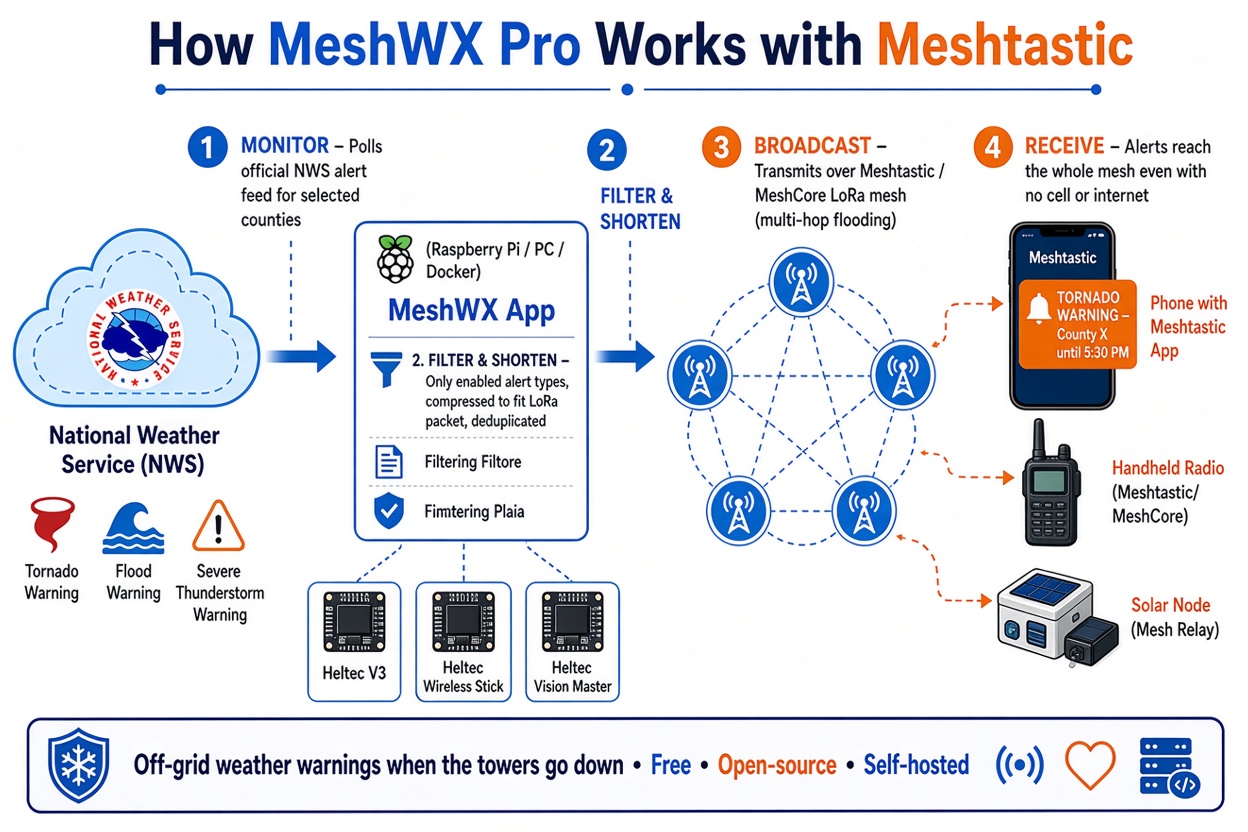
MeshWX is free firmware you can flash to your compatible Meshtastic node. The node in turn connects to WiFi and monitors the internet for weather alerts and warnings. When the program detects an alert that satisfies administrator-specified filters, it passes it along to every user on the network. It runs autonomously and does not require any special attention after the initial setup.
PUBLIC DOMAIN GRAPHIC
System requirements & caveats.
You’ll need a MeshWX Pro-compatible node. Only the node that will receive and broadcast the alerts to your network needs to be compatible. Individual users can keep the equipment they already have.
MeshWX Pro requires a WiFi internet connection. Once again, the WiFi is only required on the one node that will act as the gateway for sending the alerts. An internet connection is not required for every individual user.
The MeshWX Pro firmware must be downloaded on a laptop or desktop computer running Chrome or Edge. The official MeshWX Pro website makes reference to GitHub having firmware for other browsers but I could not find it on GitHub.
Very important: MeshWX Pro is a supplemental tool. It is not a substitute for certified & official reporting channels. It is not operated by or affiliated with any government agency or service.
And lastly, at this writing (August 2026) MeshWX Pro is available only as a beta version. Therefore, there may be undocumented glitches. Hopefully we’ll see an updated production release at some point in the future.
Setting it up.
There’s not a lot to go through here, especially if you’re already familiar with Meshtastic. Download the firmware. Flash the firmware into your MeshWX Pro-compatible node. Connect the node to WiFi and add it to your existing group.
Next, set up your filters. This allows alerts for your individual needs. You can for example designate only certain types of alerts or geographic areas. This flexibility prevents your network from being flooded with irrelevant or unimportant alerts.
From there, you’re done. Use your Mesh network in the usual way. If the system detects alerts that satisfy your filter rules, everyone will be notified.
Possible uses.
Survivalists and preppers: set up one MeshWX Pro-enabled node as a “base station”. Users on the network can receive alerts without compromising the security and privacy of their other text messages.
EMCOMM: Similarly, a “base station” could be set up in a command trailer or headquarters building. This is particularly useful because these facilities often have internet connectivity even in disaster conditions.
Your cellphone as a hotspot.
I could not confirm if MeshWX Pro will connect to a cellphone hotspot. If it does, it makes the system that much more useful. Campers, outdoorsmen, hikers, and scout groups can easily and inexpensively add a layer of safety to their activities.
The main advantage is that MeshWX Pro will automatically distribute important weather alerts to your group even if they do not themselves have internet or cell service.
Resources:
Download the firmware here.
Here is a list of compatible hardware.
Click here for the MeshWX Pro main webpage.